Sweep 2


 Sweep 2
This tool allow us to generate a surface through profile curves and following two surface edges (called rails).
Toolbar |
SubD › Creation › Sweep 2 |
Menu |
Clayoo › Creation › Sweep 2 |
Command |
_ClaySweep2 |
Dragging the dots will allow you to dynamically change the seam, and clicking on the arrow to flip the curve.
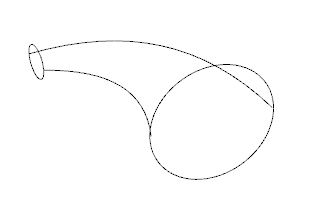
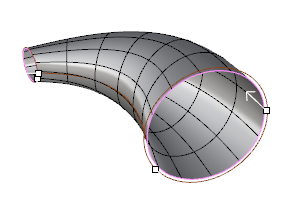
Current curves |
Result |
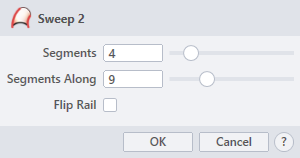
› Segments
Sets the number of divisions along the profiles.
› Segments Along
Sets the number of divisions along the central axis.
› Flip Rail
Flips the surface edge (rail).
1. Click  button to validate the command and apply the new geometry on the scene.
2. Click  button to cancel the command, and refuse to apply geometry on the scene.
3. Click  button to open the help information of the command, in case you need more detailed information about the tool being used.