SubDivision


 SubDivision
All the Clayoo commands are available in three different ways: in the menu, in the toolbar and by typing the command name in the command line.
› Menu:
Clayoo creates a menu at the top of the screen, and follows the same structures than toolbars.
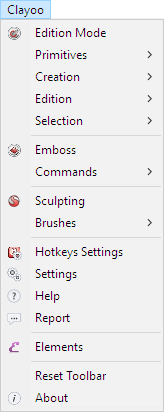
› Toolbar
The toolbar is the fastest way to access the commands. It will appear on the main toolbar after installing.
If you have any problem with the toolbar, use the command _ClayResetToolbar to go back to the initial state.

The buttons with a small arrow on the right-bottom part are "Cascade" buttons. If we click there, another toolbar with more commands will appear.
The different "Cascade" buttons are Primitives, Creation, Edition and Selection.
The toolbars are native of Rhinoceros, so we can configure them as we want.
› Command Line
All the Clayoo commands start with _Clay on the command line.
