Signet Ring


 Signet Ring
This tool allow us to generate a signet ring surface and define the size (by region or diameter) the measurements and the divisions.
Toolbar |
SubD › Creation › Signet Ring |
Menu |
Clayoo › Creation › Signet Ring |
Command |
_ClaySignetRing |
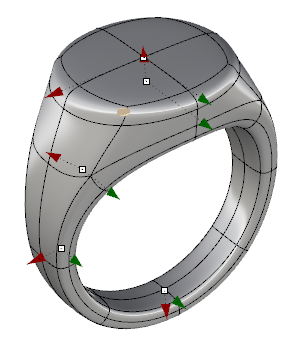
Dragging the handles will allow you to change dynamically the dimensions.
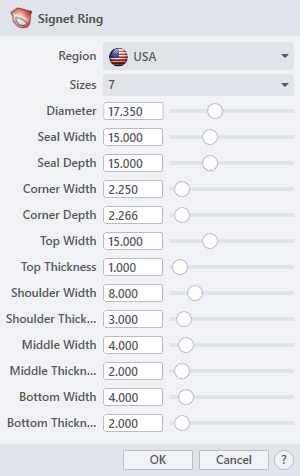
› Region
Sets the axis to create the revolve through. The drop-down list allow to choose between Europe, Finland, Germany, Hong Kong, Japan, Portugal, Spain, Taiwan, UK and USA.
› Sizes
Sets the size of the ring depending on the region. It relates with the diameter value.
› Diameter
Sets the diameter of the ring.
› Seal Width
Sets the seal broadness.
› Seal Depth
Sets the seal length.
› Corner Width
Sets the corner broadness.
› Corner Depth
Sets the corner length.
› Shoulder Width
Sets the shoulder broadness.
› Shoulder Thickness
Sets the shoulder height.
› Middle Width
Sets the middle broadness.
› Middle Thickness
Sets the middle height.
› Bottom Width
Sets the bottom broadness.
› Bottom Thickness
Sets the bottom height.
1. Click  button to validate the command and apply the new geometry on the scene.
2. Click  button to cancel the command, and refuse to apply geometry on the scene.
3. Click  button to open the help information of the command, in case you need more detailed information about the tool being used.