Bezel


 Bezel
Bezel
This tool allow us to generate automatically a bezel, using as reference a RhinoGold or Matrix gem, or a curve.
Toolbar |
SubD › Creation › Bezel |
Menu |
Clayoo › Creation › Bezel |
Command |
_ClayBezel |
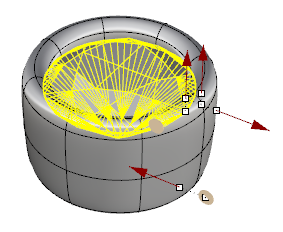
Dragging the handles will allow you to change dynamically the dimensions.
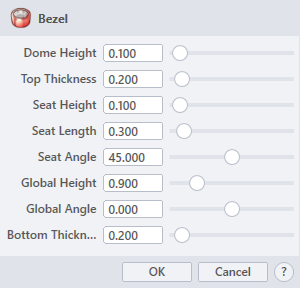
› Dome Height
Sets the size of the rounded vault.
› Top Thickness
Sets the dimension of the higher part of the bezel.
› Seat Height
Sets the vertical dimension of the gem seat.
› Seat Length
Sets the measurement of the gem seat.
› Seat Angle
Sets the angle of the gem seat (pavilion of the gem).
› Global Height
Sets the vertical dimension of the bezel.
› Global Angle
Sets the angle length.
› Bottom Thickness
Sets the dimension of the lower part of the bezel.
1. Click  button to validate the command and apply the new geometry on the scene.
2. Click  button to cancel the command, and refuse to apply geometry on the scene.
3. Click  button to open the help information of the command, in case you need more detailed information about the tool being used.