Extract Isocurve


 Extract Isocurve
This tool allow us to extract an isocurve from a Clayoo object.
Toolbar |
SubD › Creation › Extract Isocurve |
Menu |
Clayoo › Creation › Extract Isocurve |
Command |
_ClayExtract Isocurve |
Giving edges to detect the direction, the command will create the curve following the surface along the object:
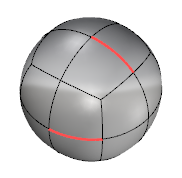
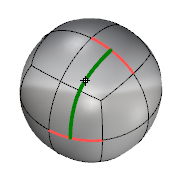
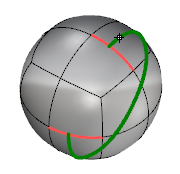
Current selection |
Inner Isocurve |
Outer Isocurve |
If the object is in Basic View (not smooth) when running _ClayExtractIsocurve, the isocurve extracted will follow the boxed object.
1. Click  Enter button on your keyboard or
 mouse right-click to validate the command.
2. Click  Escape button on your keyboard to cancel the command.
3. Click  Function key 1 button to open the help information of the command, in case you need more detailed information about the tool being used.