Torus


 Torus
Torus
It creates a torus where you can define the radius and the thickness, and the segments along the radius and in Z axis.
Toolbar |
SubD › Primitives › Torus |
Menu |
Clayoo › Primitives › Torus |
Command |
_ClayTorus |
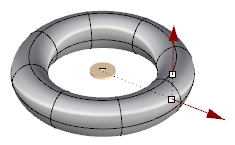
Dragging the handles will allow you to change dynamically the dimensions, and double-clicking to set the exact value.
Moving the disk will change the position of the center of creation.
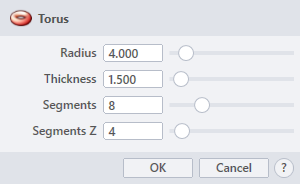
› Radius
Sets the size from the center of the torus to the center of the cross-sectional circle.
› Thickness
Sets the size of the cross-sectional circle. It acts as a second radius.
› Segments
Sets the number of divisions along the radius.
› Segments Z
Sets the number of divisions along the cross-sectional circle.
1. Click  button to validate the command and apply the new geometry on the scene.
2. Click  button to cancel the command, and refuse to apply geometry on the scene.
3. Click  button to open the help information of the command, in case you need more detailed information about the tool being used.